
Most organizations today run five, ten, or even twenty separate AI tools across their operations, and almost none of them talk to each other. That silence is expensive. When your contract analysis platform can’t feed insights to your marketing automation system, or your natural language processing engine operates in isolation from your data analytics stack, you’re leaving measurable efficiency gains on the table. Connecting AI tools via APIs (Application Programming Interfaces) resolves this fragmentation, enabling real-time data flow, automated workflows, and coordinated intelligence across your entire technology stack. This guide walks you through every stage of that process, from foundational concepts to verified, optimized deployments.
Understand API Integration for AI Tools
Now that we’ve defined the problem, let’s build your foundation for connecting AI tools effectively.
An API is a defined contract that allows two software systems to communicate. Think of it as a standardized messenger: one system sends a request, the API routes it, and the receiving system responds with data or an action. For AI tools specifically, APIs are the mechanism that allows a machine learning model, a natural language processing engine, or a data analytics service to receive inputs from external systems and return structured outputs.
There are several integration patterns worth understanding before you begin:
- Single model integration: One AI tool connects to one data source or application via a direct API call. This is the simplest setup and a good starting point for teams new to AI connectivity.
- Ensemble integration: Multiple AI models are called in sequence or in parallel, with outputs from one feeding into another. This pattern is common in complex workflows like document processing pipelines.
- Automated workflow integration: AI tools are embedded into orchestrated business processes, triggering automatically based on events, schedules, or data thresholds. This is where innovative AI use cases become genuinely transformative at scale.
- Standardized multi-tool integration via MCP: The Model Context Protocol (MCP) is an emerging standard that defines a consistent interface for connecting AI models with external tools, data sources, and services. As noted in the MCP Model Context Protocol Complete Developer Integration Guide, model-context/tool integration can be standardized via MCP, which defines an interface to connect AI models with external tools, data sources, and services through a consistent contract using JSON-RPC 2.0.
Why MCP matters: Before MCP, every AI tool vendor defined its own integration schema. Developers had to write custom adapters for each connection, multiplying maintenance costs and introducing inconsistency. MCP creates a shared language, meaning a tool built to the MCP standard can be connected to any MCP-compatible client without custom mapping code.
The practical benefit for business leaders is significant. Standardized integration reduces time-to-deployment, lowers engineering costs, and makes it far easier to swap or upgrade individual AI components without rebuilding the entire integration layer. If you’re evaluating AI integration services, understanding this protocol landscape will help you ask the right questions and set realistic timelines.
What You Need to Connect AI Tools via API
With the fundamentals clear, you’ll need to gather the right tools and prepare your environment before initiating connections.
Preparation is where most integration projects either succeed or stall. Teams that rush to implementation without completing a proper readiness assessment routinely encounter authentication failures, data format mismatches, and security vulnerabilities weeks into the project. Here’s what you need to have in place:
Technical requirements:
- A clearly documented target AI tool with a published API specification (REST, GraphQL, or JSON-RPC 2.0)
- A host environment capable of making outbound API calls (cloud server, on-premise application, or middleware platform)
- Secure credential storage for API keys and tokens (environment variables or a secrets manager like HashiCorp Vault)
- A testing environment separate from production
Personnel requirements:
- At least one developer with experience in API protocols and HTTP request handling
- A security reviewer who can assess authentication flows and permission scopes
- A business analyst who can map integration outputs to measurable operational outcomes
Platform and tooling requirements:
| Tool/Library | Purpose | Notes |
|---|---|---|
| Postman | API testing and documentation | Ideal for early-stage endpoint verification |
| JSON-RPC 2.0 | Protocol for MCP-based integrations | Required for MCP-compliant AI tools |
| REST client libraries | HTTP request handling | Available in Python, Node.js, Java, and others |
| OAuth 2.0 / API key auth | Authentication | Choose based on the AI provider’s requirements |
| Logging frameworks | Monitoring and debugging | Essential for production environments |
| Secrets manager | Credential security | Prevents key exposure in source code |
The MCP architecture includes three core components: a host (the AI application making requests), a client (the connector layer), and a server (the capability provider exposing tools, resources, and prompts). Understanding this structure helps your team assign clear ownership of each layer before development begins.
When reviewing AI tool readiness for integration, confirm that the tool’s API documentation is current, that rate limits are clearly specified, and that the vendor provides a sandbox environment for testing.
Pro Tip: One of the most common preparation mistakes is skipping a formal security review before integration begins. API keys embedded in source code, overly broad permission scopes, and unencrypted credential storage are all vulnerabilities that surface in production at the worst possible time. Build a security checklist into your pre-integration phase, not as an afterthought.
Step-by-Step Guide for Connecting AI Tools via API
You’re now equipped with what you need. Here’s how to bring your integration to life, step by step.
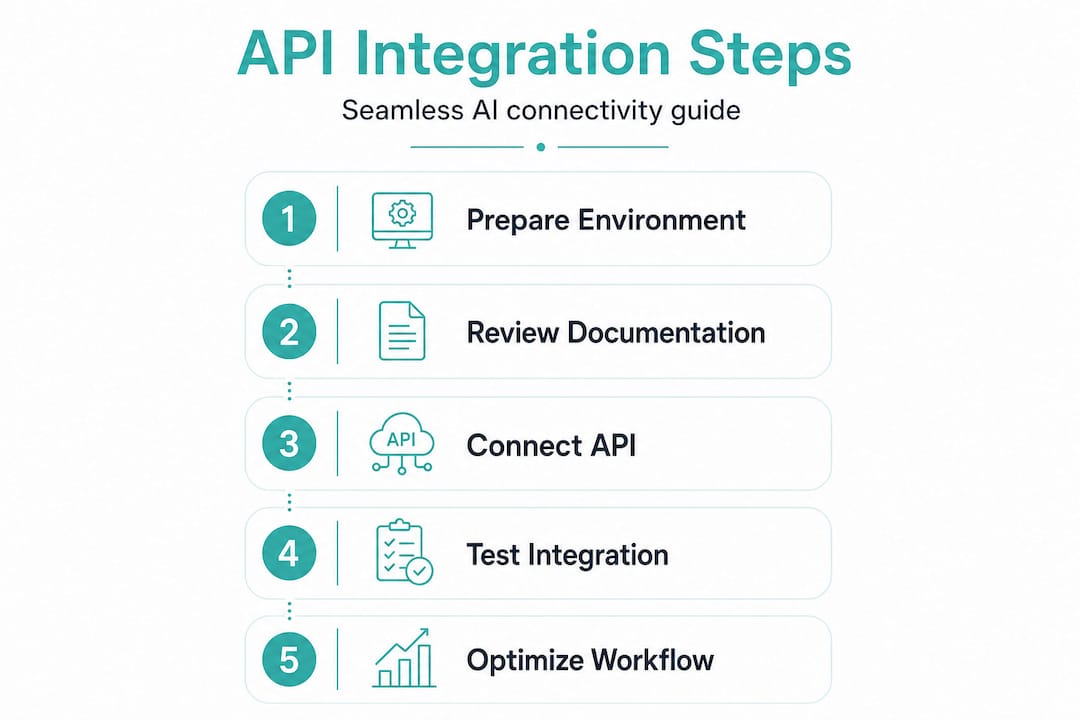
Select your AI tool and review the API documentation thoroughly. Before writing a single line of code, read the full API reference. Identify the base URL, available endpoints, required headers, authentication method, request/response formats, and rate limits. Note any deprecation warnings or versioning requirements.
Register for API access and obtain your credentials. Most AI platforms require account registration and an application approval process before issuing API keys or OAuth tokens. Store these credentials immediately in a secrets manager, never in plain text files or version control.
Configure endpoint access using the appropriate protocol. For MCP-based tools, this means configuring a JSON-RPC 2.0 connection. As the MCP specification defines, MCP connects AI models with external tools and services through a consistent contract using JSON-RPC 2.0, which standardizes how requests are structured and how responses are parsed. For REST-based tools, configure your base URL, set required headers (Authorization, Content-Type), and define your request payload structure.
Implement the connection in code. Write a minimal integration function that calls a single endpoint, handles the response, and logs both the request and the response. Avoid building complex logic at this stage. Validate that the basic connection works before adding business logic layers.
Test against multiple endpoints and edge cases. Submit requests with valid data, invalid data, missing fields, and oversized payloads. Verify that error responses are handled gracefully.
Pro Tip: Save versioned copies of your integration scripts from the start. API providers update their specifications, and having a version history lets you quickly identify what changed when an integration breaks after a provider update. You can also review a prototype API integration to see how structured versioning accelerates iteration cycles.
Comparison of common integration approaches:
| Approach | Speed of setup | Flexibility | Maintenance burden | Best for |
|---|---|---|---|---|
| REST direct API calls | Moderate | High | Moderate | Custom integrations |
| JSON-RPC 2.0 (MCP) | Fast (once familiar) | High | Low (standardized) | Multi-tool AI setups |
| Wrapper SDKs | Fast | Moderate | Low | Rapid prototyping |
| No-code middleware | Very fast | Low | Low | Simple, linear workflows |
Troubleshooting and Common Mistakes
After implementation, staying vigilant against common integration mistakes ensures long-term reliability.
Even well-planned integrations encounter problems. The key is knowing which errors to expect and how to resolve them quickly.
- Authentication failures: These usually result from expired tokens, incorrect header formatting, or misconfigured OAuth scopes. Verify that your Authorization header matches the provider’s exact specification and that tokens are refreshed before expiry.
- Mismatched data formats: If your request payload uses a different data type than the API expects (for example, sending a string where an integer is required), the API will return a 400 error. Always validate your payload structure against the API schema before sending.
- Timeout errors: These occur when the AI model takes longer to respond than your client’s timeout setting allows. Increase timeout thresholds for compute-heavy endpoints and implement retry logic with exponential backoff.
- Rate limit violations: Most AI APIs enforce request limits per minute or per day. Implement request queuing and monitor your usage against the provider’s limits. Cache responses where appropriate to reduce redundant calls.
- Permission scope errors: Requesting an action that your API key is not authorized to perform returns a 403 error. Review your credential configuration and ensure that the assigned scopes match the operations your integration requires.
Security warning: Exposed API keys are among the most exploited vulnerabilities in production systems. A single leaked key can result in unauthorized usage charges, data breaches, and service disruption. Rotate credentials regularly, restrict key permissions to the minimum required scope, and audit access logs for anomalous activity.
MCP’s consistent contract approach reduces tool invocation errors across clients by standardizing how requests and responses are structured, which significantly narrows the surface area for format-related bugs. For teams managing multiple AI tools, this consistency is a substantial operational advantage.
How to Verify and Optimize Your AI Tool Integration
After troubleshooting, you must ensure your integration remains robust and continues delivering value over time.
Verification is not a one-time event. It’s an ongoing discipline that separates integrations that deliver sustained business value from those that degrade silently until a critical failure surfaces.
Run end-to-end integration tests in a staging environment. Simulate real business scenarios, not just technical edge cases. If your integration connects a contract analysis AI to your document management system, test it with actual contract formats, not just sample JSON payloads.
Establish baseline performance metrics. Record response times, error rates, and throughput under normal load. These baselines give you a reference point for detecting degradation before it becomes a user-facing problem.
Implement automated monitoring and alerting. Set up alerts for error rate spikes, response time increases beyond your defined threshold, and authentication failures. MCP enables consistent invocation and monitoring for connected AI tools, making it easier to instrument multi-tool setups with unified observability.
Log all inputs and outputs at the integration layer. Structured logs allow you to trace exactly what data entered the system and what the AI tool returned, which is essential for debugging and for demonstrating compliance in regulated industries.
Schedule regular performance and security reviews. API providers update their specifications, deprecate endpoints, and change authentication requirements. A quarterly review cycle that checks for provider updates, tests credential validity, and benchmarks performance against your baselines will keep your integration healthy.
Pro Tip: Automate your integration tests so they run on every deployment. A broken integration that reaches production because no one ran a manual test is a preventable failure. CI/CD pipelines with integration test suites are standard practice for teams running AI-powered workflows at scale.
What Most Guides Miss About AI Tool API Integration
Most technical guides treat API integration as a purely engineering problem. Get the authentication right, format the payload correctly, handle the errors, and you’re done. That framing is incomplete, and it’s why so many integrations that work technically still fail to deliver business value.
The real challenge is alignment. A well-connected AI tool that no one in the organization trusts or uses consistently is not an integration success. It’s a technical artifact. The organizations that extract genuine, measurable value from AI/API integrations invest equally in change management, stakeholder education, and governance frameworks alongside the technical implementation.
Business process alignment is the piece most often skipped. Before connecting an AI tool to your workflow, map exactly how the tool’s outputs will change how people work. If your AI contract analysis tool flags risk clauses automatically, who reviews those flags? What’s the escalation path? What happens when the AI is wrong? These questions need answers before go-live, not after.
Stakeholder buy-in is equally critical. Integration projects that are driven entirely by IT without meaningful input from the business units that will use the outputs routinely produce tools that are technically functional but operationally irrelevant. Involve end users early, gather feedback on output formats and workflow fit, and iterate.
Finally, architectural flexibility matters more than most organizations realize at the outset. AI tools and API specifications evolve rapidly. An integration built on rigid, tightly coupled code will require significant rework every time a provider updates their API or you decide to swap one AI model for a better one. Investing in practical AI deployment advice and modular, loosely coupled architectures from the beginning pays dividends for years. The organizations that build for adaptability rather than just for today’s requirements are the ones that compound their AI investments over time rather than repeatedly rebuilding from scratch.
How Silk Data Accelerates Your AI Integration Journey
If you’re ready to go beyond theory and see real value from AI/API integration, Silk Data offers the expertise and infrastructure to make it happen efficiently.
Silk Data’s team of more than 65 full-time engineers has spent over a decade building and deploying AI integrations across education, finance, marketing, retail, and environmental sectors. Our ready-made integration frameworks reduce time-to-deployment significantly, and our AI development services are designed to align technical execution with your specific business outcomes. Whether you need a rapid prototype or a production-grade multi-tool AI architecture, we bring both the engineering depth and the strategic perspective to deliver results. Explore our machine learning project success case studies to see how we’ve solved integration challenges similar to yours, or review our data science integration expertise to understand the full scope of what’s possible. Let’s work on your next project together.